Lightweight Terminal IDE with Integrated Coding Agent
Testing Coding Agents and creating a tool that works alongside them

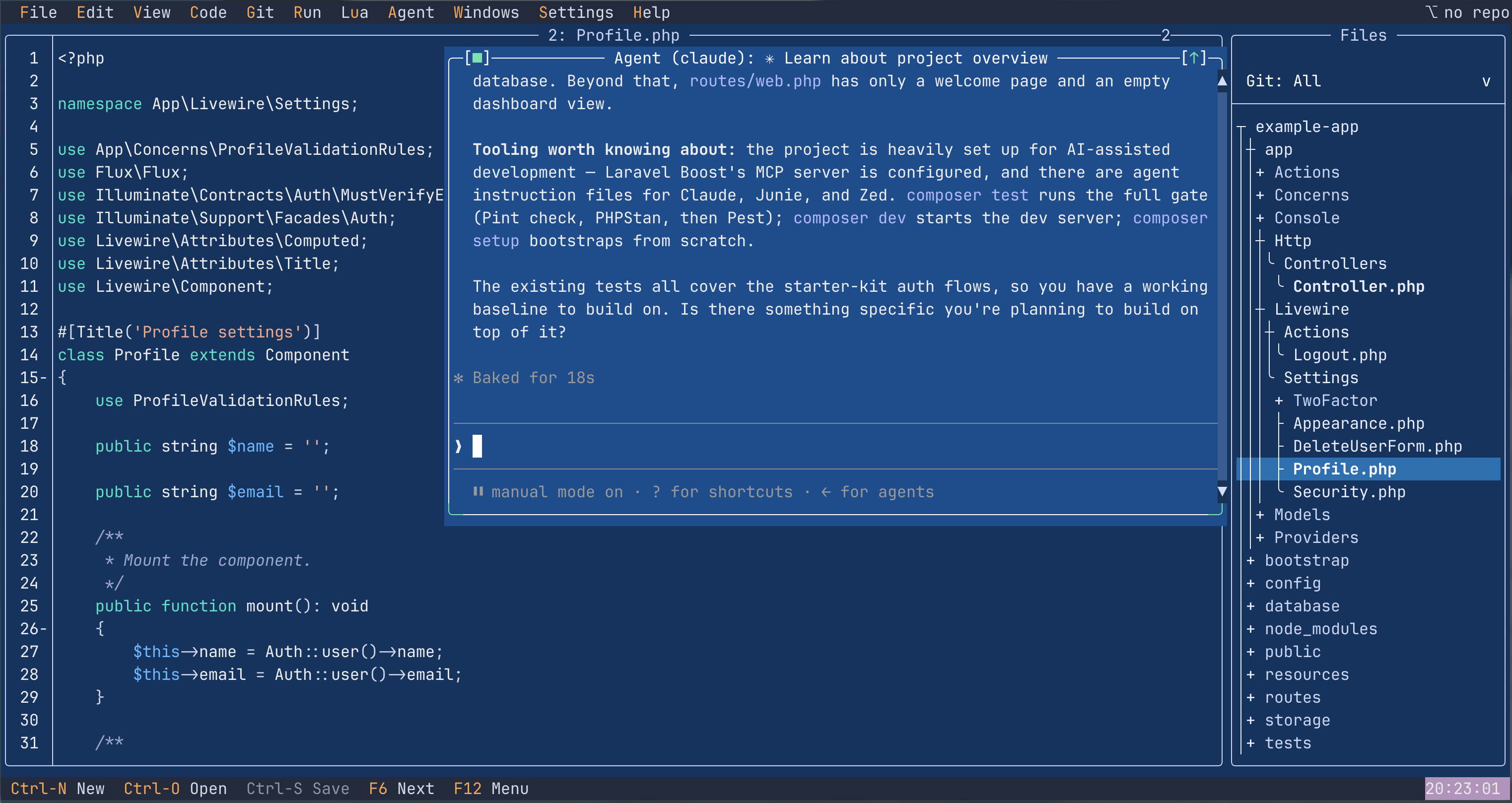
Development is changing, agentic coding is taking over. Teams are writing a rapidly growing proportion of their code, in any language or framework, using coding agents - the amount of hand-written code is dropping fast. It is incredible to see how quickly this transition has happened.
I wanted to see if we can reach a point where we can produce a meaningful product without any handwritten code at all, but I needed a useful example to stretch and prove the ability of coding agents.
One key thing I am finding from work on Laravel and Phoenix projects is that my working patterns have changed significantly. Historically I worked mainly in an IDE (Jetbrains) but now I am writing (much) less code by hand and increasingly working from a terminal first - and often that terminal is on a remote machine. While I am writing less code manually, it is still very useful to have an IDE - to review output, refresh my memory of existing implementations and increasingly to write and review specification documents. See: https://astbs.substack.com/p/experience-of-successfully-apply
I am therefore finding a need for a simple TUI-based IDE that is small, quick to start and easy to integrate with a coding agent.
There is of course Vim, and many people are incredibly efficient with it. But that efficiency comes from use and familiarity: the key codes and the muscle memory. Ironically, as agentic coding reduces the need to use editors, that muscle memory gets exercised less and less. And if, like me, you come from a GUI IDE background such as VS Code or JetBrains, then Vim is a fresh learning curve you may not want to take on.
So what I needed was a TUI-based IDE that made use of a mouse in the terminal, with common key mappings familiar to those coming from a GUI IDE, and menus that made the functionality discoverable.
Anyone who has been developing long enough may have fond (or otherwise) memories of the Borland IDEs. These were terminal-based and, for their time, very productive. In the early 90s Borland released the framework they were built on, Turbo Vision, alongside their compilers. A quick search found a modern port of Turbo Vision, and even a demonstration editor called Turbo, based on the proven Scintilla editor, by magiblot/turbo.
Turbo was an editor, though, not an IDE.
So the challenge was: could I use just an AI agent to develop a simple IDE from the basis of magiblot/turbo? It turns out the answer is yes and turboIDE was created (turboide.co).
Using Claude Code, I was able to add the following to the existing Turbo base:
Built an integrated Agent window that runs a coding agent inside the IDE. A local MCP server (over a Unix socket) presents the IDE’s own functionality to the agent as callable tools, and the agent is configurable.
Moved Scintilla and Lexilla to a git submodule on the latest versions. In the original Turbo these were a copy of the source, slightly modified. The agent understood the integration, moved it to a submodule, and made it easy to keep up to date with core Scintilla. This is the single detail I’d point to for anyone who remains sceptical about what these tools can do. It’s real architectural reasoning, not autocomplete/copy paste work.
Updated the existing tree view into a project (directory) view.
Expanded menus and key mappings to familiar IDE standards.
Added lightweight Git integration, including git status in the project view, plus add, commit, branch, push and pull.
Added a terminal window (reused by the Agent integration).
Added Lua as a scripting language for the editor, including integration with the command palette. All Lua scripts are also exposed as tools to the coding Agent.
Added build commands and a simple output window to show build results and error messages, which can jump straight to the right file and line.
Implemented build pipelines to ensure releases are up to date with the repository. The build pipelines were also configured with Claude Code.
Made changes to the underlying Turbo Vision library to modernise aspects like borders and scrollbars.
The result is, hopefully, a simple but useful terminal-based IDE with an integrated coding agent.
Code reviews are simpler, minor edits are easy, the context of the project is visible and navigable, and point-and-click operation means there’s no need to remember a multitude of keys that are getting less exercised than they used to be.
How long did it take?
About six weeks of elapsed time, but very little of that was actually dedicated effort. The agent ran in a terminal that sat open on my desktop in the background while getting on with other work. I prompted it occasionally as I noticed things to add or fix. It was less a project I sat down to build and more one that happened alongside everything else. That, in itself, says something about how the economics of coding have shifted.
I won’t pretend it was without problems. There were points where the agent needed steering, and places where I had to lean on knowing what Turbo Vision was actually doing under the hood. (I started my professional career as a C++ programmer, and even used Turbo Vision on a couple of products, so this was familiar, if ancient, history.)
But the overhead of that was low enough, and infrequent enough, that the project stayed alive across those six weeks rather than dying after my initial interest waned.
I have now progressively moved to using agents running inside turboIDE as my primary interface for working on Laravel (and Phoenix) projects.
Why it matters
While agents are now proven in use, I think this example has demonstrated their ability along two important dimensions.
Agents can reason over unfamiliar code. Turbo Vision almost certainly did not feature heavily in any training set, and the agent still worked with it very effectively.
Agents enable projects that otherwise simply would not exist. This isn’t a project I, or possibly anyone else, would have undertaken by hand. Yet the result hopefully has value to more people than just me.
Additionally, although the premise of the work was that I didn’t write any code myself and relied entirely on the agent, knowledge of the language, the frameworks and of course the domain all mattered in achieving the outcome. Developers are not going away anytime soon.
Please try it out at turboide.co. Builds are available for download for Windows and Mac with simple build instructions for Linux (including Raspberry Pi).